2.9.0 Release Notes (10/05/26)
Document Details | |
|---|---|
Document Issue Level: | 1.0 |
Document Issue Date: | Oct 5, 2026 |
Product Details | |
|---|---|
Product Description: | Symmetry IDM - CONNECT and GUEST |
Release Version: | 2.9.0 |
Introduction
This bulletin provides an overview of product improvements and an introduction to new features included in Symmetry CONNECT/GUEST/IDM for hosted and on-premise deployments.
Note
For Hosted customers, the planned deployment date will be communicated via the online status page. Please visit: https://symmetry-identity-management-saas.statuspage.io/
Private Cloud Customers, please access your dedicated status page.
Legal Information
Please refer to the AMAG Technology Software License Agreement, available at: Legal References
Symmetry Integration Client:
The AMAG.Symmetry.Client has been updated to version 9.0.0.2107 Certain new features or corrections will not be fully functional until the new client has been installed; any such items will be highlighted in the proceeding notes.
The Checksum for this Symmetry client is:
6056e9086087da0bc4c4bed64bde756d96171ddd32f579443eabc601a80b4965
Warning
Customers who utilize firewalls for their Amag.Symmetry.Client will be required to update rules to allow TCP ports 5671, 5672 & 443.
Scan Utility:
The Scan Utility has been updated to version 3.4.0.293. The installer now includes the USB driver required by the IDSnap 850DX scanner and reports clearly when the scanner driver is unavailable.
Customers using the IDSnap 850DX or 960CDX scanners are advised to install the updated utility.
New / Changed Functionality
New Dashboard:
Signing in now lands every user on a new, unified Dashboard, which replaces the separate CONNECT and GUEST dashboards. Each user automatically sees the widgets relevant to their roles and purchased modules, with no administrator configuration required.
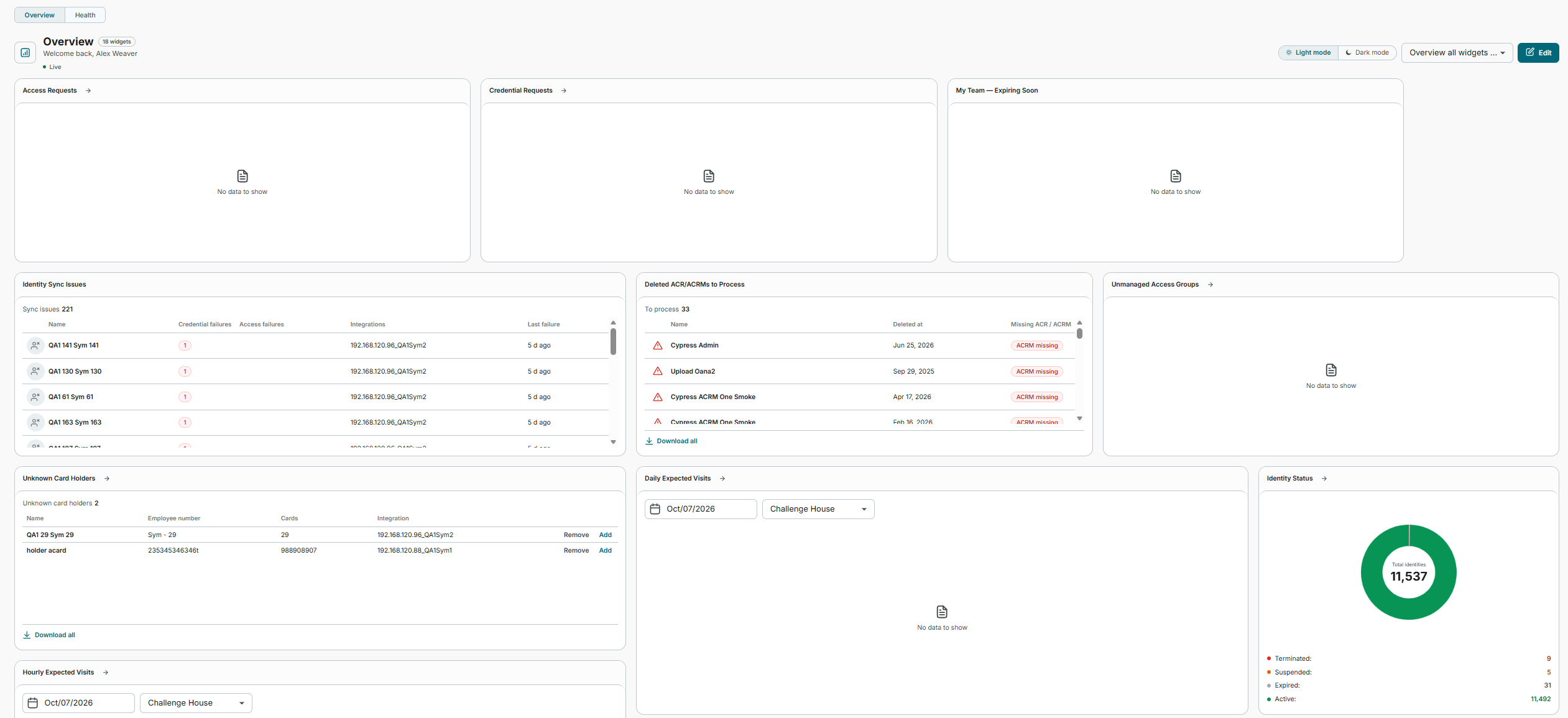
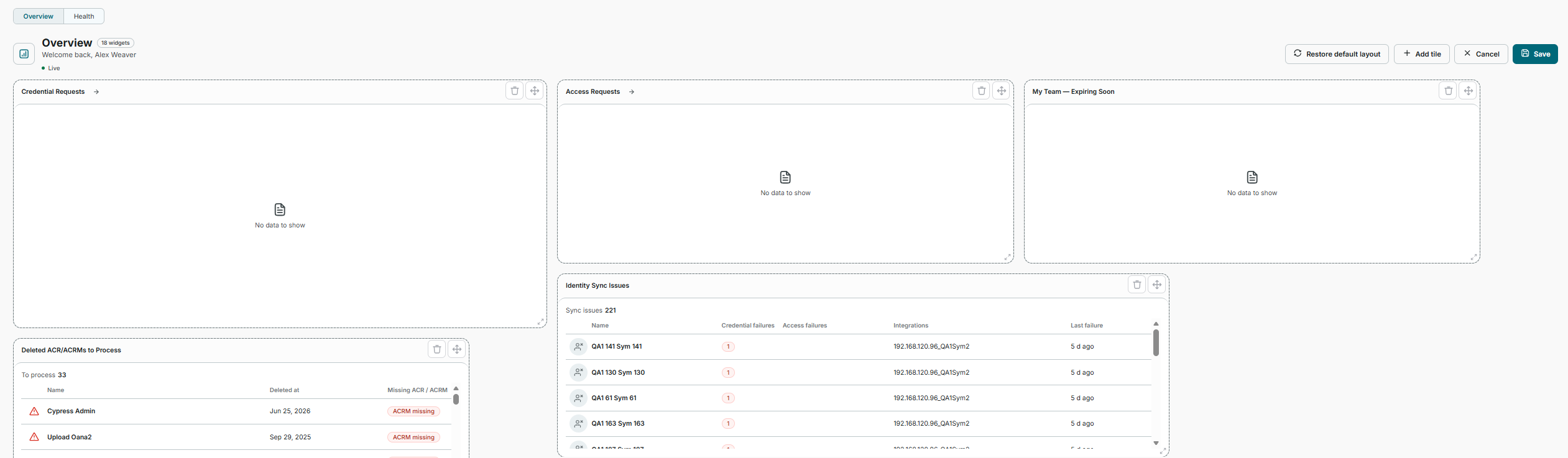
Personal customization - Using Edit Dashboard, users can add, remove, reorder and resize tiles, choose the chart style for a tile, and restore the default layout at any time. Layouts are saved per user.
CONNECT widgets - Audits, Unmanaged Access Groups, Unknown Card Holders, Deleted ACR/ACRMs, Access and Credential Removal, Access Management Mismatch, Access Requests and Credential Requests. Approvers can approve or reject Access Requests directly from the Dashboard.
GUEST widgets - Upcoming Visits, Favourite Visitors, Host Delegates, Hourly Expected Visits, Daily Expected Visits, and an Information tile with links to the calendar add-in, the print and scan utilities and other tools.
IDM widgets - Identity Status Overview, Identity Sync Issues, My Team, My Team - Expiring Soon, and a Saved Reports tile that brings together saved reports from CONNECT, GUEST and IDM.
Users with no assigned roles see My Details and My Requests, so every user has a useful landing page.
Every widget links through to the relevant page in the owning module. Widgets refresh automatically every 30 seconds and a Refresh control is available on the page.
The Dashboard is responsive across desktop, tablet and mobile, and supports dark mode and right-to-left languages.
The previous CONNECT and GUEST dashboards, the CONNECT dashboard template configuration and the CONNECT Audits statistics page have been removed, as they are replaced by the new Dashboard and its widgets.
Access Group Deletion Management
CONNECT no longer removes an access group immediately when the access control system reports it as deleted. If any identity holds the access group, the deletion is held for review; if nobody holds it, the deletion is applied automatically and recorded.
A new Deletion Management page under Configuration > Access Groups lists deletions awaiting review, showing the reporting integration, the number of access assignments affected and the identities who would lose access. Administrators can confirm the deletion or keep the access group, individually or in bulk.
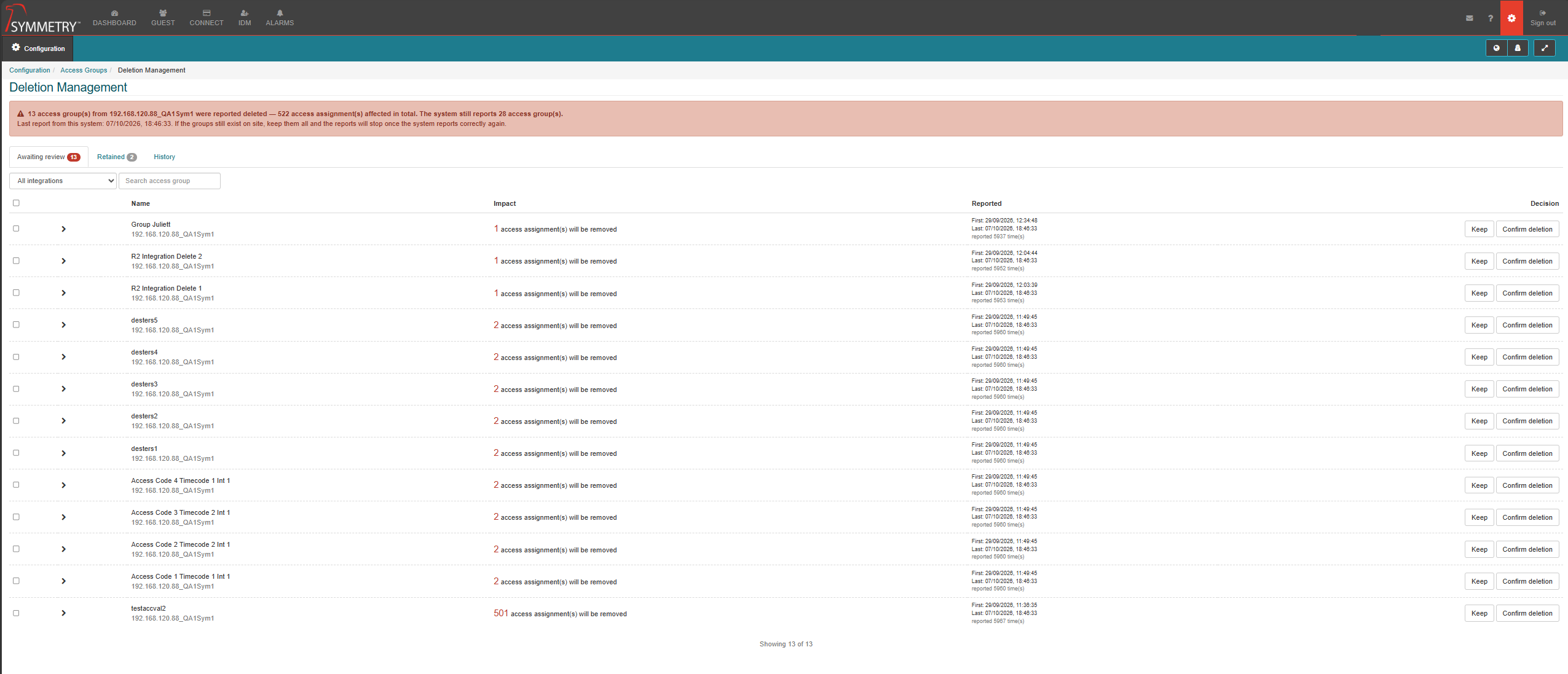
Retained and History tabs show the access groups that were kept, and a record of every applied deletion, including who made the decision and the assignments removed.
If the access group reappears in the access control system, the pending deletion clears itself.
Apply ID Reference Number Changes to Reports
When the ID Reference Number length is changed, the confirmation dialog now includes an Apply to all reports option, selected by default, so that the updated reference numbers are also applied to existing report data and identities can be tracked consistently over time.
Key Issues Addressed
This section lists bug fixes included in the release.
Reference | Summary |
|---|---|
ZD237349 | An issue has been addressed with two identities being able to hold the same ID Reference Number. |
ZD237399 | An issue has been addressed with Access Rules not applying their access groups to all matching identities. |
ZD238841 | An issue has been addressed with the Manager not being populated for some identities in the Complete Identity Extract report. |
ZD239076 | An issue has been addressed with "Select all identities that match your filter" applying access changes to identities outside the user's company partition. The Grant Access screen now also shows the number of identities that will be affected. |
ZD239416 | An issue has been addressed with the photo cropping tool on the Credential Request page being difficult to drag and resize. |
ZD239448 | An issue has been addressed with users being prompted to re-enter their password when enabling Allow Third Party Authentication Bypass. |
ZD239545 | An issue has been addressed with the Facility Code Whitelist being switched off when changes were saved under IDM Settings > General. |
ZD239707 | An issue has been addressed with rule-based access being re-granted to a terminated identity immediately after it had been removed, which affected the audit trail. |
ZD239901 | An issue has been addressed with the Public API allowing the same identity to be set as more than one of an identity's Managers. |
ZD239910 | An issue has been addressed with an error message being displayed when the Refresh button on the Credentials or Access tabs was pressed repeatedly. |
ZD239933 | An issue has been addressed with the "Access Granted" option missing from the Card Activity Report filter. |
An Issue has been addressed with the Public API credential update command shifting a credential's Activation and Expiration dates by the building's time zone offset when those dates were not supplied in the request. | |
An issue has been addressed with a weekly recurring visit in GUEST being rejected with "The start time can't be in the past" when the first occurrence was not today. Recurring visit checks now use the building's time zone. | |
An issue has been addressed with the Explicit Access Codes section appearing on the New Visit form in GUEST when the matching access control rule did not allow explicit access, which prevented the visit from being saved. | |
An issue has been addressed with User Defined Fields marked as Editable in Screen Configuration being read-only on the Identity details page until Screen Configuration was saved again. Identity details now follow the Editable setting exactly as shown in Screen Configuration. | |
We have addressed an issue with the CONNECT Reports page being slow to open for customers with a large audit history. | |
We have addressed an issue with the Card Activity Report timing out when the Access Group Building filter was applied. | |
We have addressed an issue with some terminated identities not holding a termination date, which excluded them from data retention processing. |