Credential Expiration Notification - Building Manager
Description
This email is sent to identities that hold the IDM Building Manager role to notify them of identities in the building they manage that have credentials that are expiring. This email can be configured via the CONNECT > Configuration > Notification Credential page and allows you to enable or disable this email as well as define when it should be sent out.
Information displayed includes:
Number of days until expiration
Identity information
First Name
Last Name
Credential Number
Employee Number
Email Address
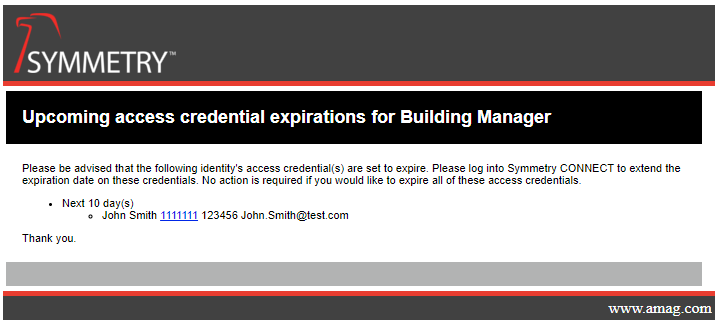
Template
<table width="700" cellpadding="16" style="font-size: 11px;font-family: Arial, lucida console, sans-serif;">
  <tr>
    <td align="left" style="background-color: black; color: white; font-size:18px; font-weight: bold;">
      Upcoming access credential expirations for Building Manager
    </td>
  </tr>
  <tr>
    <td>
      <p>Please be advised that the following identity's access credential(s) are set to expire. Please log into Symmetry CONNECT to extend the expiration date on these credentials. No action is required if you would like to expire all of these access credentials.</p>
      <ul>
        @foreach (var credentialsForDayLeft in Model.CredentialsByDayLeft)
        {
          <li>Next @credentialsForDayLeft.DaysLeft day(s)</li>
          <ul>
            @foreach (var credentialInfo in credentialsForDayLeft.CredentialInfos)
            {
              <li>@credentialInfo.FirstName @credentialInfo.LastName <a href="@credentialInfo.ActionUrl"> @credentialInfo.Number</a> @credentialInfo.EmployeeNumber @credentialInfo.Email</li>
            }
          </ul>
          <p></p>
        }
      </ul>
      <p>Thank you.</p>
    </td>
  </tr>
  <tr>
    <td align="left" style="background-color: #b2b3b3; padding: 12px;"></td>
  </tr>
</table>
Razor Elements
Element | Description |
|---|---|
@credentialsForDayLeft.DaysLeft | Displays the number of days until expiration |
@credentialInfo.FirstName | Displays the first name of the identity with an expiring credential |
@credentialInfo.LastName | Displays the last name of the identity with an expiring credential |
@credentialInfo.ActionUrl | A URL that will take you to the identities page |
@credentialInfo.Number | Displays the credential number of the identity with a credential that is about to expire |
@credentialInfo.EmployeeNumber | Displays the employee number of the identity with an expiring credential |
@credentialInfo.Email | Displays the email address of the identity with an expiring credential |
Warning
It is recommended that these elements be used as stated with the only edits being to remove them if the information generated is not required.
Using Razor Elements in Loops
Razor elements may be defined as part of a @foreach loop to iterate through a collection.
Example:
@foreach (var credentialsForDayLeft in Model.CredentialsByDayLeft)
In the example above:
Model.CredentialsByDayLeftis the collection provided by the template modelcredentialsForDayLeftis a Razor element created for iterationThe element represents an individual item from the collection
Note
Razor elements created within a loop are locally scoped.
These elements are only available within the loop in which they are defined
They are not part of the main
ModelThey cannot be referenced outside of the loop
Additional Information:
Razor elements referencing
@Modelproperties are available throughout the template.Razor elements defined within loops are intended for temporary use when iterating through collections.
To reference data outside of a loop, use the appropriate
@Modelelement.
Warning
Razor elements defined within a loop (for example, @credentialsForDayLeft) must only be used within that loop. Attempting to reference these elements outside of their scope will result in an error.