2.10.0 Release Notes (11/03/26)
Document Details | |
|---|---|
Document Issue Level: | 1.0 |
Document Issue Date: | Nov 3, 2026 |
Product Details | |
|---|---|
Product Description: | Symmetry IDM - CONNECT and GUEST |
Release Version: | 2.10.0 |
Introduction
This bulletin provides an overview of product improvements and an introduction to new features included in Symmetry CONNECT/GUEST/IDM for hosted and on-premise deployments.
Note
For Hosted customers, the planned deployment date will be communicated via the online status page. Please visit: https://symmetry-identity-management-saas.statuspage.io/
Private Cloud Customers, please access your dedicated status page.
Legal Information
Please refer to the AMAG Technology Software License Agreement, available at: Legal References
Important Deployment Information
For general deployment guidance, please refer to the Connect & Guest Deployment Guide (Issue v1.54.0)
Symmetry Integration Client:
The AMAG.Symmetry.Client has been updated to version 9.1.0.2127. Certain new features or corrections will not be fully functional until the new client has been installed; any such items will be highlighted in the proceeding notes.
The Checksum for this Symmetry client is:
737400344d56796fb7891edfd6fd9b0fd22b0320f111f2e478d13f04fe40bd7e
Scan Utility:
The Scan Utility remains at version 3.4.0.293, as delivered in release 2.9.0. Customers already running this version do not need to reinstall it.
New / Changed Functionality
We have sunset the classic view on IDM. Customers will be automatically migrated over to the new User Interface.
Badge Template Database Fields:
More identity fields can now be selected as database fields in the CONNECT badge template designer, so badges can be personalized with an identity's Building, Location, Floor, Expiration Date, Manager, Identity Category and Gender in addition to the fields already available.
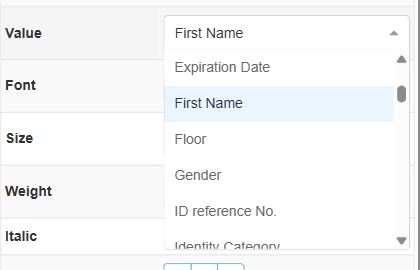
User Defined Fields of the types Date, Date and Time, Dropdown, Number Field, Text Area, Text Field and Time can also be selected, and appear in the field list using their configured display name.
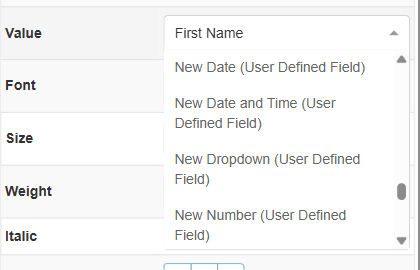
If an identity has no value for a selected field, the field is left blank on the badge. Existing badge templates are not affected.
Access Start and End Date and Time in Access Request Emails:
Access Request email notifications now include the start and end date and time of the access being requested.
Advanced ID Scanner - Document Number, Document Type and Expiration Date Mapping:
The Data Mapping tab of the GUEST Advanced ID Scanner configuration has three new User Defined Field mappings: Number, Document Type and Expiration Date.
Document Number
Document Type
Expiration Date
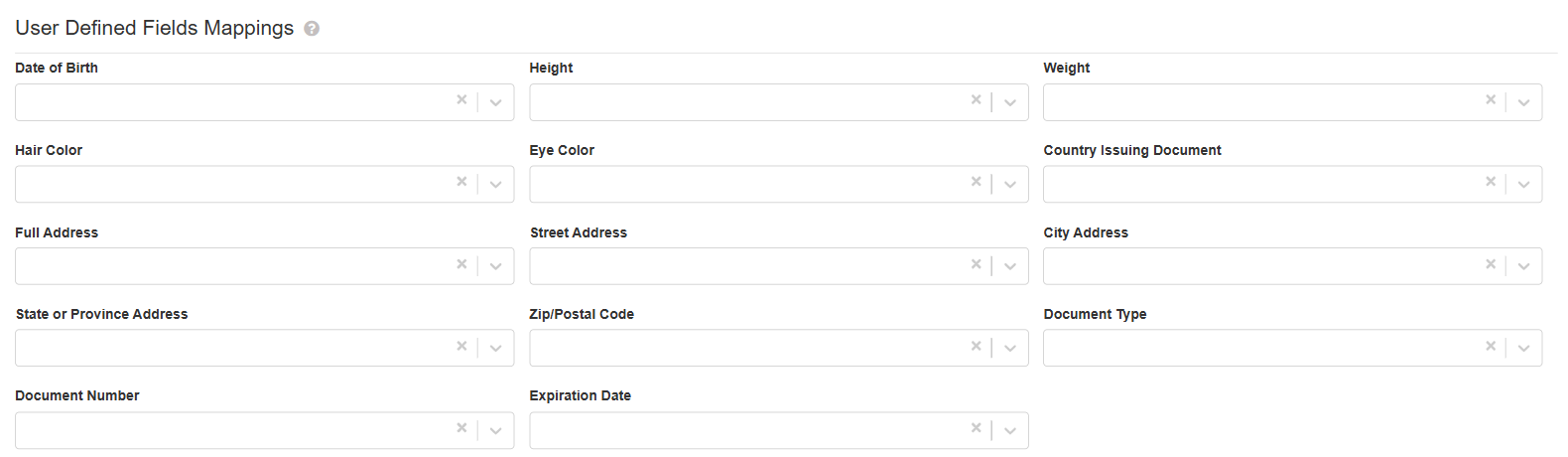
Document Number and Document Type can be mapped to Text Field or Text Area User Defined Fields, and Expiration Date to a Date field. Document Type is saved as a readable label such as Driver License, Passport or ID Card.
Mapped values are saved when a new visitor is created from a scan, provided the field is on the Guest Screen Configuration for the building and visitor type. Existing mappings are kept.
Audits Dashboard Widget Matches My Audits:
The Audits widget now counts the same audits that the signed-in user sees on My Audits. Administrators and ACR Administrators see every audit in the group, and ACR Managers can switch between Mine and My team.
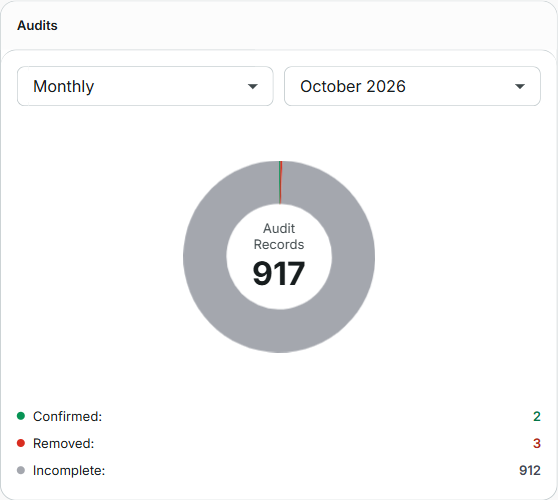
When Manage Audits via a separate user role is enabled, Auditors see the audits for the access groups assigned to their role, and ACRs and ACR Managers without the Auditor role no longer see the widget.
The previous Audits Dashboard page has been removed; its address now opens My Audits.
Permission Errors No Longer Sign Users Out:
A signed-in user who tries an action their role does not allow now sees a permission message and stays signed in, instead of being signed out. Only a missing or expired session signs a user out.
Key Issues Addressed
This section lists bug fixes included in the release.
Reference | Summary |
|---|---|
ZD239250 | An issue has been addressed with the Facility Code list not showing every facility code that covers a typed card number, and with the card number not following the facility code selected when assigning a credential. |
ZD239992 | An issue has been addressed with badges designed in the new view printing with a blank margin at the edge of the card. |
ZD241204 | An issue has been addressed with new and replacement credentials showing as Active in CONNECT and Symmetry but being treated as Inactive when swiped. |
ZD24115 | An issue has been addressed with an identity's initials being shown as "undefined" when the first or last name contains a leading or trailing space. |
ZD241194 | An issue has been addressed with the Lock icon not being displayed for terminated identities in the new view. |
An Issue has been addressed with orphaned access code assignment records building up in Symmetry after access codes were removed or deleted, which could cause communication timeouts. |