2.2.0 Release Notes
Document Details | |
|---|---|
Document Issue Level: | 1.0 |
Document Issue Date: | March 26, 2026 |
Product Details | |
|---|---|
Product Description: | Symmetry IDM - CONNECT and GUEST |
Release Version: | 2.2.0 |
Introduction
This bulletin provides an overview of product improvements and an introduction to new features included in Symmetry CONNECT/GUEST/IDM for hosted and on-premise deployments.
Note
For Hosted customers, the planned deployment date will be communicated via the online status page. Please visit: Symmetry Identity Management (IDM) Status
Private Cloud Customers, please access your dedicated status page.
Important Deployment Information
For general deployment guidance, please refer to the Connect and Guest Deployment Guide (Issue 1.75.0)
On-Premise Deployments:
Warning
For Customers Upgrading from versions earlier than 1.71.0, upgrade to 1.71.0 before upgrading to this release.
Warning
Before upgrading to 2.2.0 run the following scripts in SQL:
Use idm
IF NOT EXISTS (SELECT * FROM sys.indexes WHERE name =
'ix_projection_employee_data_feed_report_group_id_identity_ids' AND object_id =
OBJECT_ID('projection.employee_data_feed_report'))
    CREATE NONCLUSTERED INDEX [ix_projection_employee_data_feed_report_group_id_identity_ids]
    ON [projection].[employee_data_feed_report] (group_id ASC, identity_id ASC)
    WITH (PAD_INDEX = OFF, STATISTICS_NORECOMPUTE = OFF, SORT_IN_TEMPDB = OFF,
DROP_EXISTING = OFF, ONLINE = OFF, ALLOW_ROW_LOCKS = ON, ALLOW_PAGE_LOCKS = ON) ON
[PRIMARY]
GO
IF NOT EXISTS (SELECT * FROM sys.indexes WHERE name =
'ix_projection_employee_data_feed_report_group_id_manager_id' AND object_id =
OBJECT_ID('projection.employee_data_feed_report'))
CREATE NONCLUSTERED INDEX [ix_projection_employee_data_feed_report_group_id_manager_id]
ON [projection].[employee_data_feed_report] (group_id ASC, manager_id ASC)
WITH (PAD_INDEX = OFF, STATISTICS_NORECOMPUTE = OFF, SORT_IN_TEMPDB = OFF,
DROP_EXISTING = OFF, ONLINE = OFF, ALLOW_ROW_LOCKS = ON, ALLOW_PAGE_LOCKS = ON) ON
[PRIMARY]
GOUse connect
USE connectIF NOT EXISTS (SELECT * FROM sys.indexes WHERE name =
'ix_projection_card_activity_report_group_id_identity_ids' AND object_id =
OBJECT_ID('projection.card_activity_report'))
    CREATE NONCLUSTERED INDEX [ix_projection_card_activity_report_group_id_identity_ids]
    ON [projection].[card_activity_report] (group_id ASC, identity_id ASC)
    WITH (PAD_INDEX = OFF, STATISTICS_NORECOMPUTE = OFF, SORT_IN_TEMPDB = OFF,
DROP_EXISTING = OFF, ONLINE = OFF, ALLOW_ROW_LOCKS = ON, ALLOW_PAGE_LOCKS = ON) ON
[PRIMARY]
GO
IF NOT EXISTS (SELECT * FROM sys.indexes WHERE name =
'ix_projection_symmetry_integration_support_group_id_utc_received_date' AND object_id =
OBJECT_ID('projection.symmetry_integration_support'))
CREATE NONCLUSTERED INDEX [ix_projection_symmetry_integration_support_group_id_utc_received_date]
ON [projection].[symmetry_integration_support] (group_id ASC, utc_received_date ASC)
WITH (PAD_INDEX = OFF, STATISTICS_NORECOMPUTE = OFF, SORT_IN_TEMPDB = OFF,
DROP_EXISTING = OFF, ONLINE = OFF, ALLOW_ROW_LOCKS = ON, ALLOW_PAGE_LOCKS = ON) ON
[PRIMARY]
GONote
This release requires rollback steps:
SQL:
-- Create table
CREATE TABLE [projection].[deleted_employees]
(
	[deleted_employee_id] [int] NOT NULL IDENTITY(1,1) PRIMARY KEY,
	[group_id] [uniqueidentifier] NOT NULL,
	[company_id] [uniqueidentifier] NOT NULL,
	[building_id] [uniqueidentifier] NOT NULL,
	[employee_id] [uniqueidentifier] NOT NULL,
	[create_date] [datetime] not null default(getutcdate()),
	[created_by_id] [uniqueidentifier] not null
);
GO
-- Create indices
CREATE NONCLUSTERED INDEX [IX_projection_delete_employee_select]
ON [projection].[deleted_employees] (create_date)
INCLUDE (
    deleted_employee_id,
	employee_id
    )
WITH (PAD_INDEX = OFF, STATISTICS_NORECOMPUTE = OFF, SORT_IN_TEMPDB = OFF, DROP_EXISTING = OFF, ONLINE = OFF, ALLOW_ROW_LOCKS = ON, ALLOW_PAGE_LOCKS = ON) ON [PRIMARY]
GO
CREATE NONCLUSTERED INDEX [IX_projection_delete_employee_delete]
ON [projection].[deleted_employees] (employee_id)
WITH (PAD_INDEX = OFF, STATISTICS_NORECOMPUTE = OFF, SORT_IN_TEMPDB = OFF, DROP_EXISTING = OFF, ONLINE = OFF, ALLOW_ROW_LOCKS = ON, ALLOW_PAGE_LOCKS = ON) ON [PRIMARY]
DELETE FROM [idm].[dbo].[configuration]
  WHERE [key] = 'DataRetention'
DELETE FROM [idm].[RoundhousE].[ScriptsRun]
WHERE script_name = '01.058.sql'
Portainer :
run the folloing bash command on IDM-API
curl -i -X POST http://idm-api:7124/internal/command -H 'Content-Type: application/json' -d '{"JsonPayload": "{\"Id\":\"4F3F5796-9E46-4AB7-A7F7-0D80BBB376B2\",\"Name\":\"Deleted Identity Events Cleanup v.2\",\"CommandType\":\"G4S.IdentityManagement.Contracts.Commands.PurgeIdentityEventsStoreFromDeletedIdentitiesCommand, G4S.IdentityManagement.Contracts\",\"CommandJson\":\"{\\\"NumberOfDeletedIdentitiesToPurge\\\":200,\\\"RetentionInMonths\\\":2}\",\"RestApi\":4,\"Interval\":5,\"Frequency\":0,\"ExecutionEndDate\":null,\"MaxOccurrences\":null,\"StartHour\":6,\"EndHour\":8}", "ContentType": "G4S.ServiceBus.Masstransit.CreateReoccurringCommand"}'
After a rollback was performed, when upgrading back to 2.2.0 or a higher version, the following must be done:
RabbitMQ:
Purge messages from the following queues:
- G4S.IdentityManagement.Endpoint_dataretention
- G4S.VMS.Endpoint_dataretention_manager
- Amag.CAC.Endpoint_dataretention
Symmetry Integration Client:
The AMAG.Symmetry.Client has been updated to version 7.31.0.1915. Certain new features or corrections will not be fully functional until the new client has been installed; any such items will be highlighted in the proceeding notes.
The Checksum for this Symmetry client is:
d4cc754d50b5a64ae9f89511fd5002a131223a5126843b304a3d588f34c5520c.
Warning
Customers who utilize firewalls for their Amag.Symmetry.Client will be required to update rules to allow TCP port 5671, 5672 & 443.
New / Changed Functionality
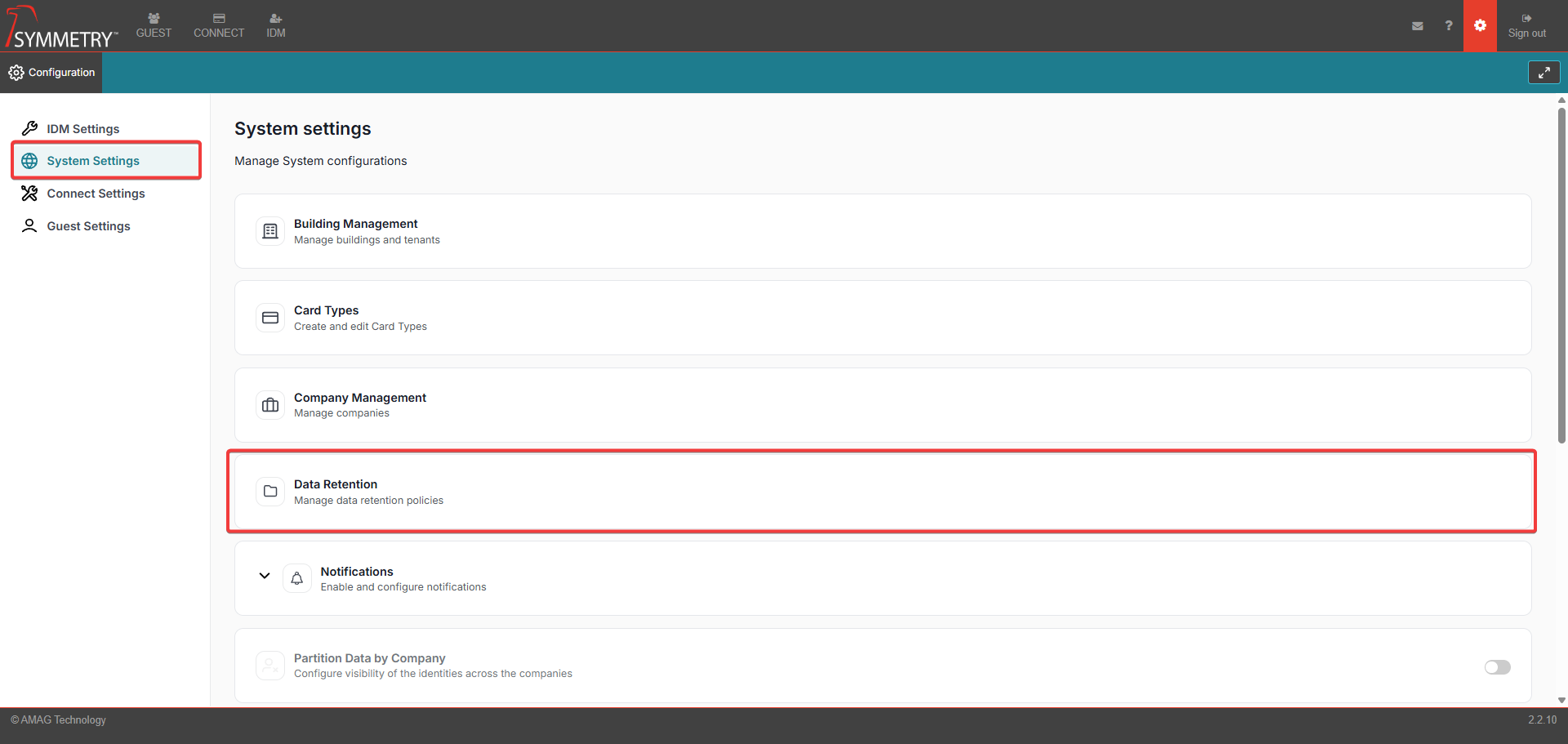
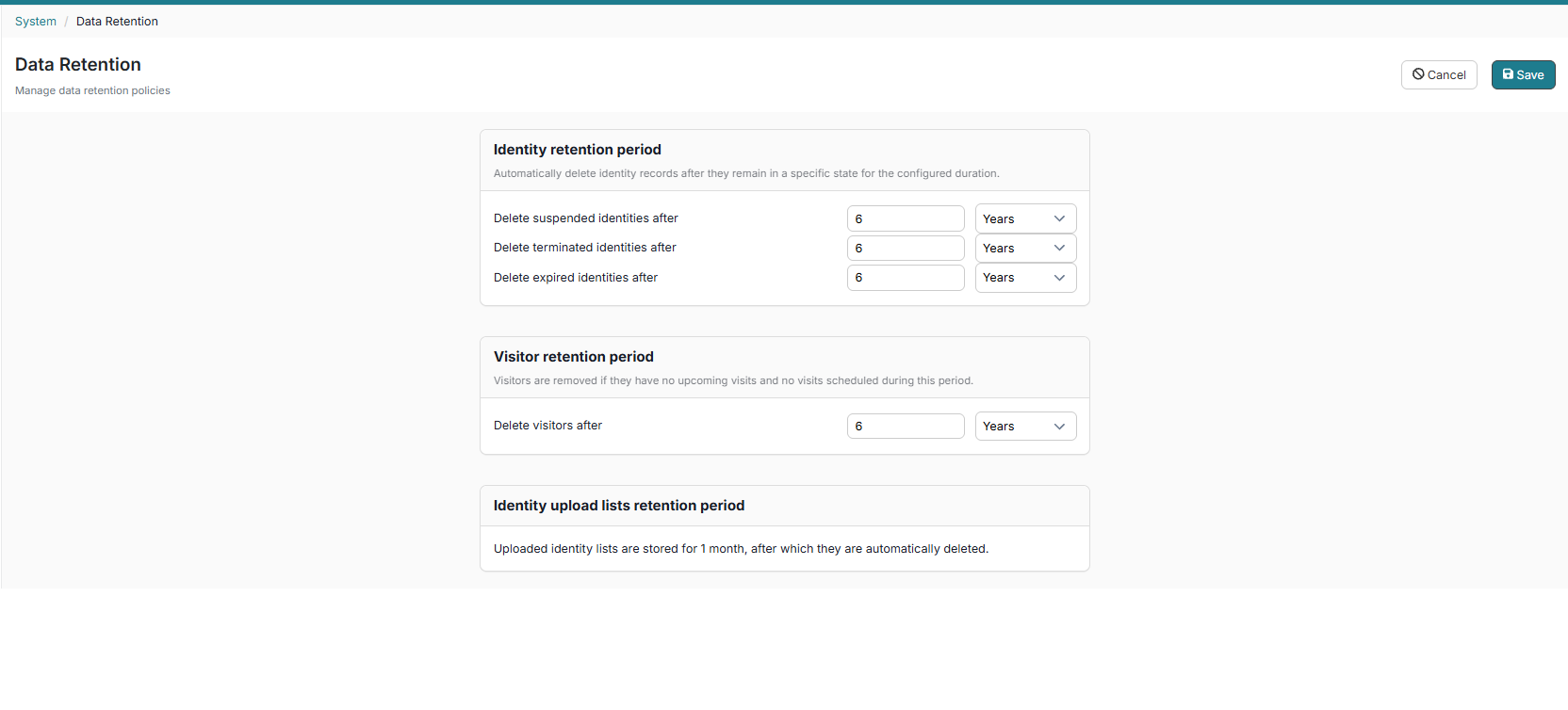
As part of our continued efforts to improve IDM, some new features have been introduced: Data Retention Settings give you greater control over how identity-related data is managed and automatically removed over time.
Administrators can now define retention periods for:
Identity Records
Suspended identities
Terminated identities
Expired identities
Visitors
The configuration can be found under the following menu: Configuration > System Settings > Data Retention
Automatic data Cleanup
The system will automatically remove records based on your configured retention policies:
Suspended Identities
Removed after remaining in a suspended state for the defined period.
Terminated Identities
Removed after continuous termination for the configured duration.
Expired Identities
Removed after remaining expired for the configured duration.
Visitors
Removed if inactive, with no past or upcoming visits, for the configured period.
Identity Upload Lists
Automatically deleted after 1 month.
Audit and Logging
Audit and LoggingAll retention-related actions are fully tracked for transparency and compliance:
Each deletion is logged with:
Timestamp
Identity ID
Action Type (delete)
Initiator (system or user)
Deletions are recorded in the Identity Audit Report, clearly indicating when records are removed due to retention policies.
Compliance
These enhancements support key regulatory standards, including:
SOC 2
GDPR
HIPAA