2.5.0 Release Notes
Document Details | |
|---|---|
Document Issue Level: | 1.0 |
Document Issue Date: | Jul 10, 2026 |
Product Details | |
|---|---|
Product Description: | Symmetry IDM - CONNECT and GUEST |
Release Version: | 2.5.0 |
Introduction
This bulletin provides an overview of product improvements and an introduction to new features included in Symmetry CONNECT/GUEST/IDM for hosted and on-premise deployments.
Note
For Hosted customers, the planned deployment date will be communicated via the online status page. Please visit: Symmetry Identity Management (IDM) Status
Private Cloud Customers, please access your dedicated status page.
Important Deployment Information
For general deployment guidance, please refer to the Connect and Guest Deployment Guide (Issue 1.75.0)
On-Premise Deployments:
Warning
Customers will not be able to take this Release until they are prepared to migrate to Kubernetes and PostgreSQL
Warning
This release requires additional rollback steps.
This release is irreversible unless a full system and database backup is applied.
Manual Roll Back Steps:
/********************************************************************************************
2.5.0 Rollback Script
Feature: Remote Door / Remote Access Administrator (epic IDM-18249)
Run ONLY if rolling back from 2.5.0 to the previous release (2.4.x).
********************************************************************************************/
--
=========================================================================================
-- NEW REPORT: Remove the Remote Access Administrator Activity Report (IDM-20383)
-- The 2.4.x app does not know this report (no xlsx template / sproc). Remove the row so it
-- does not surface as a broken report. Also delete the RoundhousE.ScriptsRun entry so that
-- on roll-forward Grate re-runs 01.005 and re-inserts the report (migration is idempotent).
--
=========================================================================================
-- Remove any saved instances first (defensive — none expected in a fresh release).
DELETE FROM idm.report_saved_reports
WHERE report_id = 'c0276c6b-91e0-4a55-afc7-2d80daf0f8d5'::uuid;
-- Remove the report registration.
DELETE FROM idm.report
WHERE report_id = 'c0276c6b-91e0-4a55-afc7-2d80daf0f8d5'::uuid;
-- Allow the report migration to re-run on roll-forward (re-inserts the report row).
DELETE FROM "RoundhousE"."ScriptsRun
"WHERE script_name =
'idmProjection/01.005_remote_access_admin_activity_report.sql';
Symmetry Integration Client:
The AMAG.Symmetry.Client has been updated to version 8.2.0.2013. Certain new features or corrections will not be fully functional until the new client has been installed; any such items will be highlighted in the proceeding notes.
The Checksum for this Symmetry client is:
30c52730c2510f09644cd124ec842f1965d5ca46710173c8cbd78c31e40ab001.
Warning
Customers who utilize firewalls for their Amag.Symmetry.Client will be required to update rules to allow TCP port 5671, 5672 & 443.
New / Changed Functionality
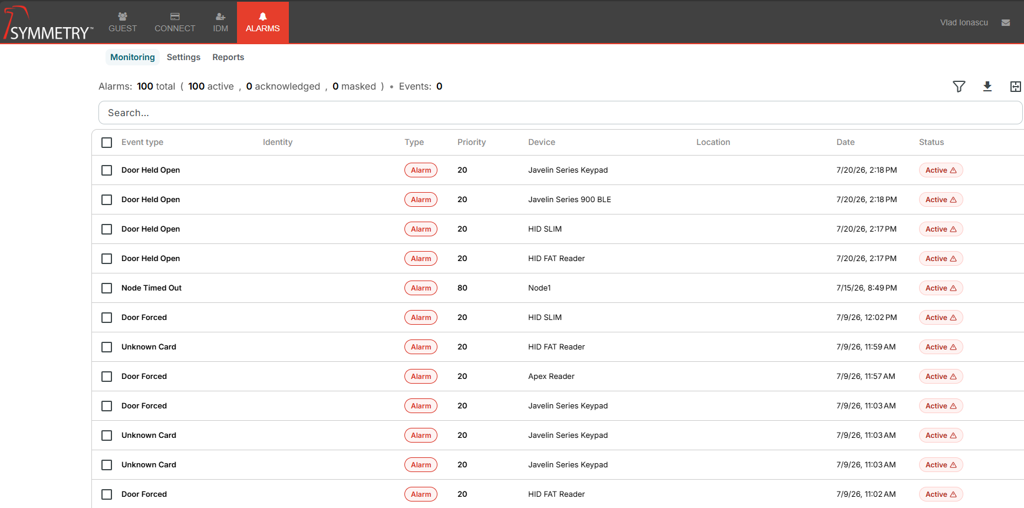
New Alarms and Events monitoring experience
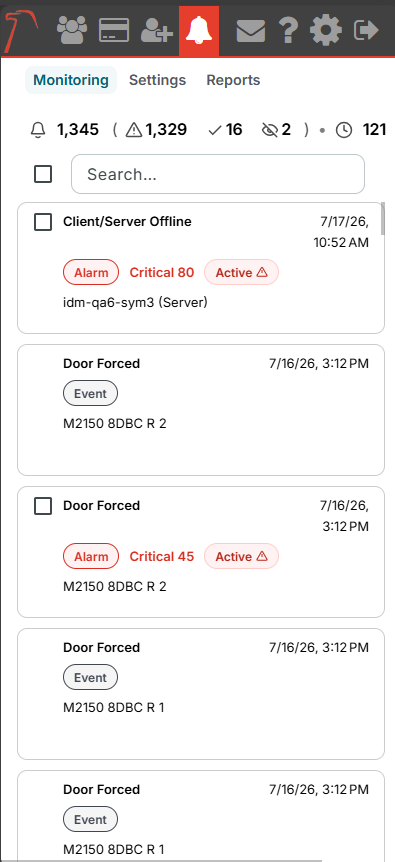
The release introduces a new centralized Alarms and Events module that allows operators to view access control events and triggered alarms from a single monitoring interface. This provides a live operational view of activity across connected systems and helps teams maintain situational awareness as they respond to incidents.
Live dashboard with flexible filtering
Operators can now filter alarms and events to focus on the activity most relevant to them. The dashboard experience includes support for filtering by event type, alarm status, device-related information, location, category, time range, and other operational attributes to help users quickly narrow large volumes of activity.
Improved live monitoring with scroll freeze and new activity indicator
When reviewing historical activity on the monitoring screen, live auto-scroll can now pause while the operator scrolls. If new alarms or events arrive during that time, a visible indicator shows that new activity is available and allows the operator to return to the latest events without losing their place.
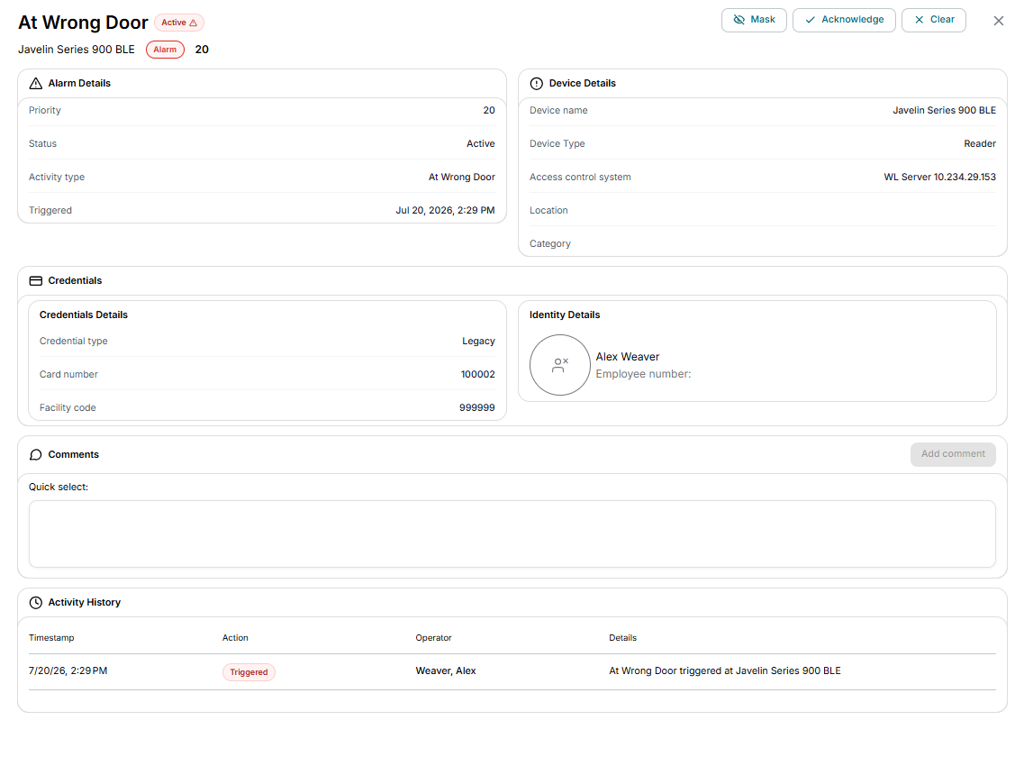
Detailed alarm view with operational context
Operators can open an alarm to review additional context before taking action. The detail view includes alarm metadata, associated device and location information, alarm instructions where configured, identity information and photo where available, comments, and activity history so that users can better assess the incident and decide on the appropriate response.
Detailed event view for investigation workflows
Access control events can now be opened in a dedicated event detail view. This provides expanded information about the event, associated device context, timing, and related identity information where available, helping operators investigate anomalies and validate access activity more effectively.
Alarm actions within the user interface
Operators can now perform alarm-related actions directly within the application, including acknowledge, undo acknowledge, clear, mask, and unmask actions where permitted. This allows incidents to be managed from the monitoring experience without relying on separate operational steps.

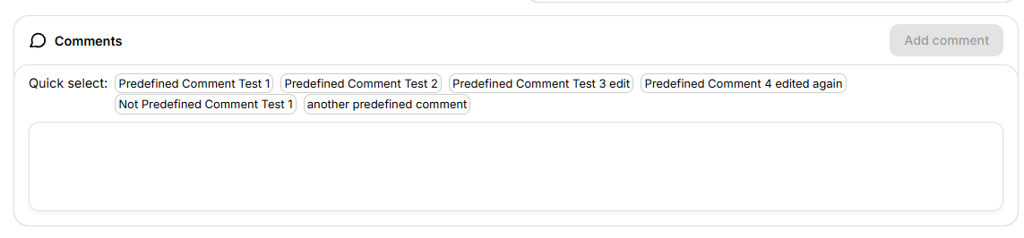
Support for predefined comments during alarm actions
When responding to alarms, users can select from predefined comments configured in Symmetry. This helps promote more consistent operator notes and supports clearer audit trails when common response reasons or operational instructions need to be captured.
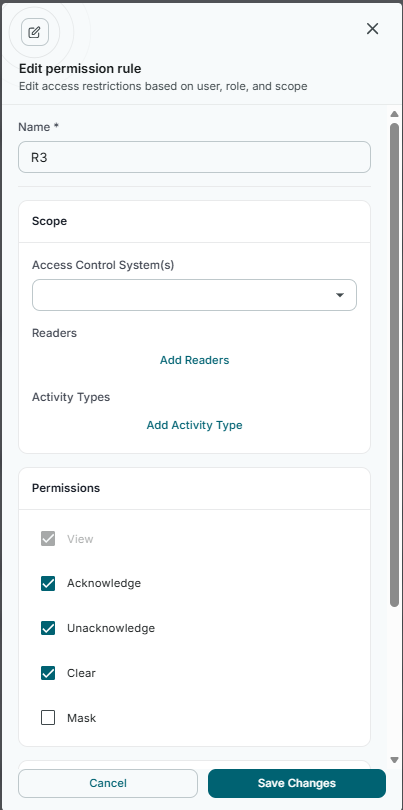
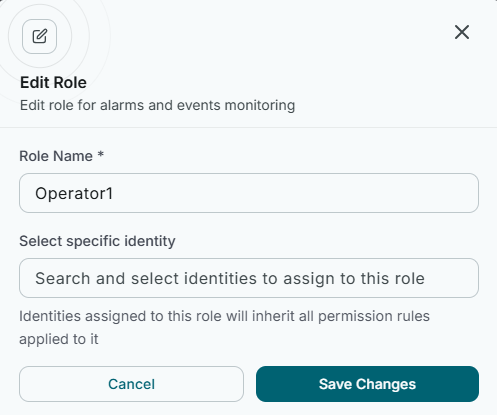
Configurable permissions for alarms and events
New configuration options allow administrators to control which users and roles can view or act on alarms and events. This supports more focused workflows by ensuring that sensitive or irrelevant activity is only visible to the appropriate users while preserving broader access for system administrators where required.
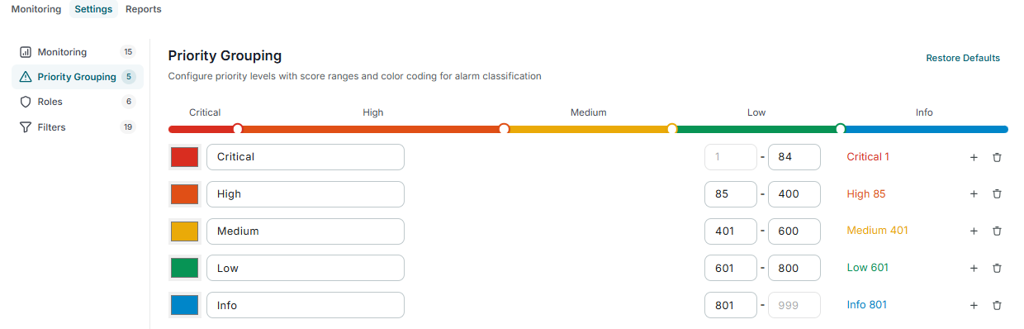
Priority grouping and monitoring configuration
Administrators can now configure alarm monitoring behaviour through settings for priority groupings and monitoring permissions. This allows organizations to align the monitoring experience with their operational model and define how activity is categorized and surfaced to users.
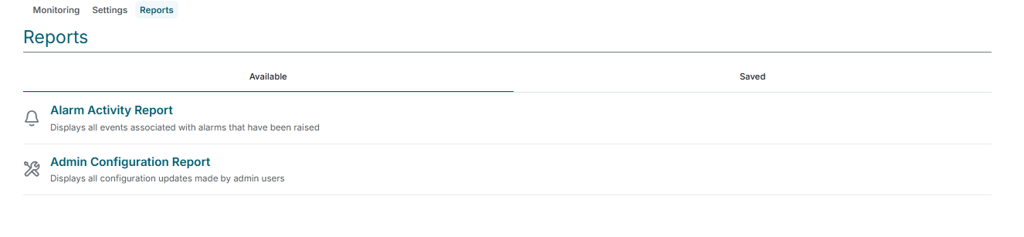
New reporting for alarm activity and administration changes
The release adds reporting support for alarm-related activity and administrative changes. The Alarm Activity Report provides historical visibility into alarms and events, while the Admin Configuration Report provides an audit trail of updates made to monitoring configuration, helping support compliance, review, and operational analysis.
Improved localization and mobile support for the Alarms and Events experience
The Alarms and Events module includes updated support for globalization, right-to-left presentation, and mobile responsiveness across monitoring, detail views, settings, and reports. These improvements help deliver a more consistent experience across languages and device types.
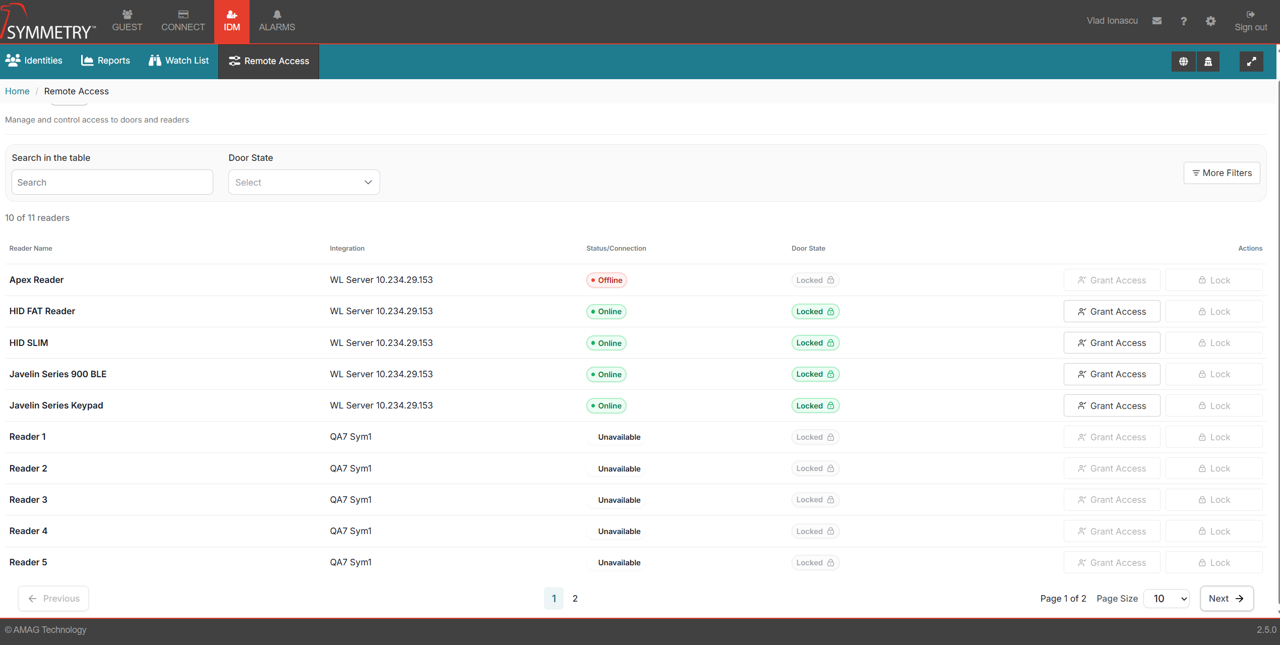
New Remote Door Control experience
Symmetry CONNECT 2.5.0 introduces Remote Door Control, giving authorised operators the ability to remotely grant access and lock doors directly from the hosted cloud solution — no on-site presence required.
Remote Door Access and Locking
We have added a new role, Remote Access Administrator, which can be assigned to any identity. Only identities with this role can remotely grant access to, or lock, a door.
Access to specific doors is managed through assigned Access Groups.
The Remote Access Administrator can unlock or lock the doors associated with the readers in their assigned Access Groups.
This feature requires NATS and is only supported on Symmetry v11, and above.
The new role can be found in the roles menu in IDM under IDM roles category
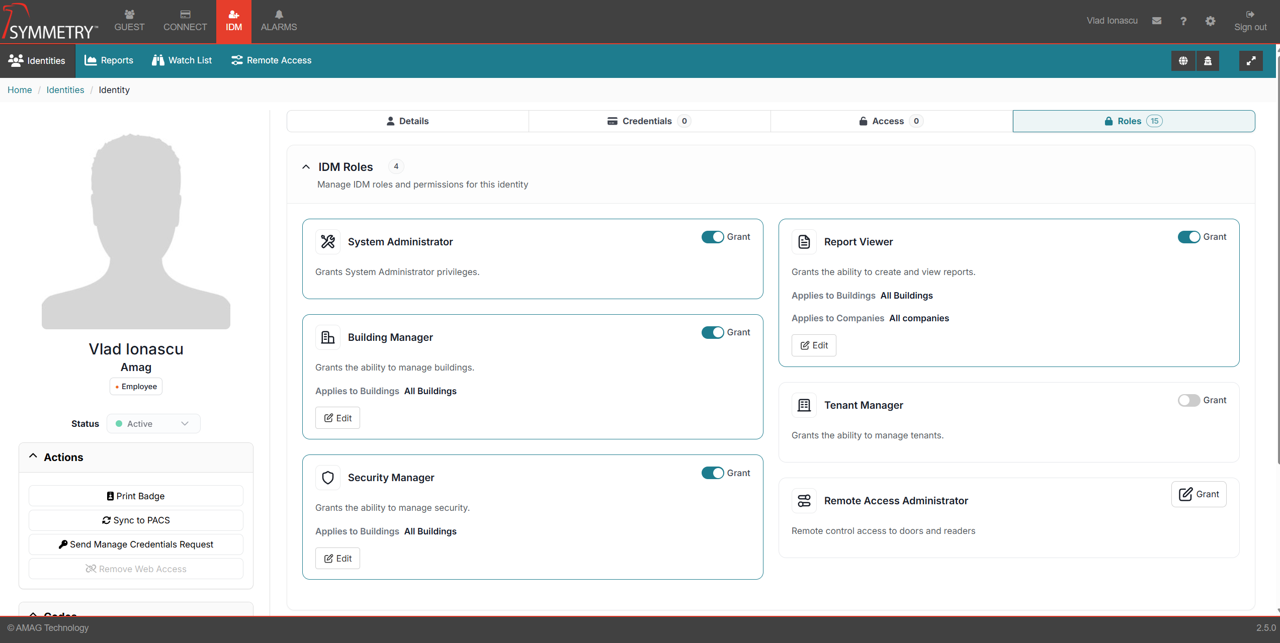
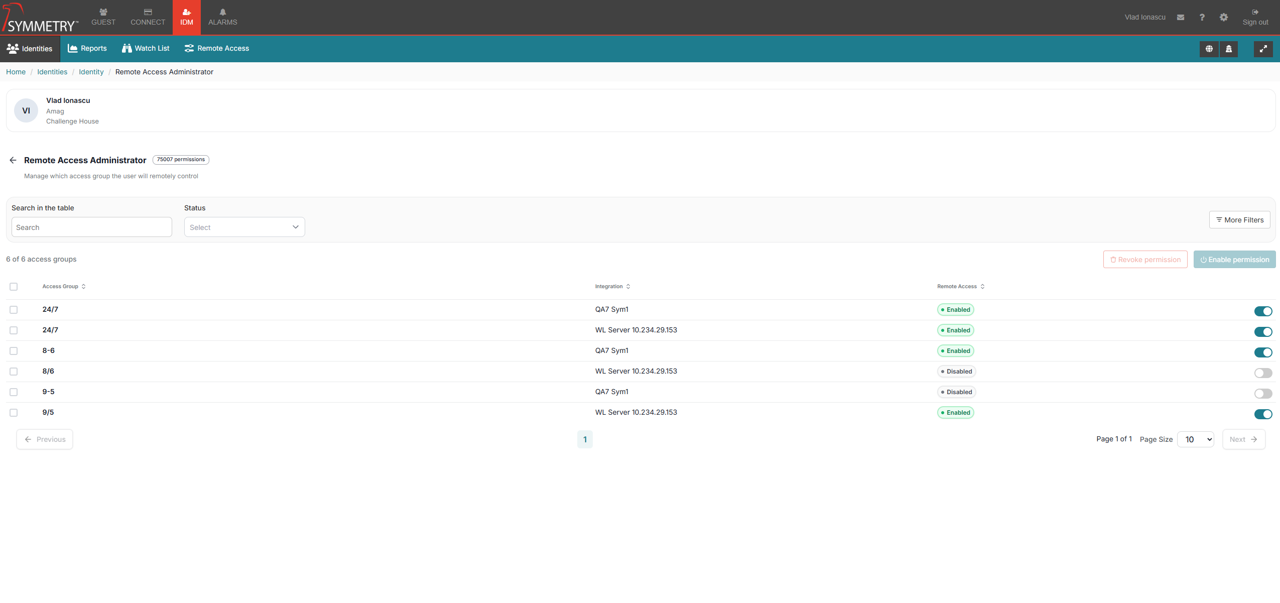
After clicking Grant next to the Remote Access Administrator role, the user will be presented with a menu displaying all Access Groups.
Only Access Groups associated with Symmetry V11 will be displayed.
The user can select individual Access Groups, or select multiple Access Groups to grant access to them all at once.
After the Remote Access Administrator role is granted, a new button will appear on the IDM page.

On the Remote Access page, the user will be presented with all the readers that are part of the assigned Access Groups.
The user has the ability to grant temporary access to a door by clicking the Grant Access button.
The door will automatically lock again after a few seconds.
The user also has the ability to lock unlocked doors by clicking the Lock button.