2.6.10 Release Notes
Document Details | |
|---|---|
Document Issue Level: | 1.0 |
Document Issue Date: | Jul 28, 2026 |
Product Details | |
|---|---|
Product Description: | Symmetry IDM - CONNECT and GUEST |
Release Version: | 2.6.10 |
Introduction
This bulletin provides an overview of product improvements and an introduction to new features included in Symmetry CONNECT/GUEST/IDM for hosted and on-premise deployments.
Note
For Hosted customers, the planned deployment date will be communicated via the online status page. Please visit: Symmetry Identity Management (IDM) Status
Private Cloud Customers, please access your dedicated status page.
Important Deployment Information
For general deployment guidance, please refer to the Connect and Guest Deployment Guide (Issue 1.75.0)
On-Premise Deployments:
Warning
Customers will not be able to take this Release until they are prepared to migrate to Kubernetes and PostgreSQL.
This release requires additional (manual) rollback steps.
********************************************************************************************
Run on eventstore database:
DELETE FROM dbo."ConnectIdentityEvents"
WHERE  eventtype IN (
    'Amag.CAC.Contracts.Events.CardOptionsUpdatedEvent, Amag.CAC.Contracts',
    'Amag.CAC.Contracts.Events.DeactivationLevelUpdatedEvent, Amag.CAC.Contracts',
    'Amag.CAC.Contracts.Events.CardUsageUpdatedEvent, Amag.CAC.Contracts'
);
********************************************************************************************
Run on eventstore database:
DELETE FROM dbo."AccessControlIntegrationEvents
"WHERE  eventtype IN (
    'AMAG.Symmetry.Contracts.Events.IntegrationCardOptionsBackfillStartedEvent,
AMAG.Symmetry.Contracts',
    'AMAG.Symmetry.Contracts.Events.IntegrationCardOptionsBackfillCompletedEvent,
AMAG.Symmetry.Contracts'
);
Symmetry Integration Client:
The AMAG.Symmetry.Client has been updated to version 9.0.0.2054 Certain new features or corrections will not be fully functional until the new client has been installed; any such items will be highlighted in the proceeding notes.
The Checksum for this Symmetry client is:
ccbb928ee97c2ec14d1a8517f1547d8a4f9aac01e815bcc8633ef01b833e34b2
Warning
Customers who utilize firewalls for their Amag.Symmetry.Client will be required to update rules to allow TCP port 5671, 5672 & 443.
New / Changed Functionality
Symmetry Card Options now available directly in the Identity Profile
Three new collapsible panels have been added to the Identity Details page to allow administrators to view and manage the Symmetry card option settings that operators have historically configured directly in Symmetry without leaving IDM. The panels are:
Card Options: The 9 on/off card option checkboxes: Card Watch, Area Occupancy, Conditional Card, Patrol, Extended Door Times, Command Card, Visitor Escort, Key Card, and Executive Card.
Deactivation Level: The threat level at which a card deactivates.
Card Usage: The number of card uses remaining.
Saving any of the three panels automatically sends that panel's changes to Symmetry as part of the save; no separate sync step is required, and the update applies across all of the identity's cards. The existing Sync to PACS action remains available and continues to push all IDM-owned fields to Symmetry in one step.
Operator-set values in Symmetry are never silently overwritten
IDM now only changes a card option in Symmetry when an IDM user deliberately edits that specific option. Previously, everyday IDM activity — such as updating an identity's name, email, or employee number, or a routine re-sync — could unintentionally push blank or stale IDM values down to Symmetry and overwrite settings an operator had carefully configured there, including the Threat/Deactivation Level.
With this change:
Editing an unrelated identity field no longer touches any card option in Symmetry.
Re-syncing an identity, or syncing it for the first time, leaves operator-set card options untouched.
Changing one card option in IDM affects only that option — all others keep their operator-set values.
Once an IDM user deliberately sets an option (including switching it off or re-saving the same value), IDM takes ownership of that value going forward and wins on future syncs.
Existing identities are automatically populated with their Symmetry values
For identities that existed before the 2.6.0 upgrade, the Card Options, Deactivation Level, and Card Usage panels will not show blank on first viewing. IDM will import each identity's values from Symmetry into the corresponding IDM fields.
Note
Identities that existed before the 2.6.0 upgrade will not have any card options, Deactivation Level, or Card Usage actively managed by IDM until a user manually changes one of those fields in IDM.
Resync now reconciles card options, and only the fields IDM owns
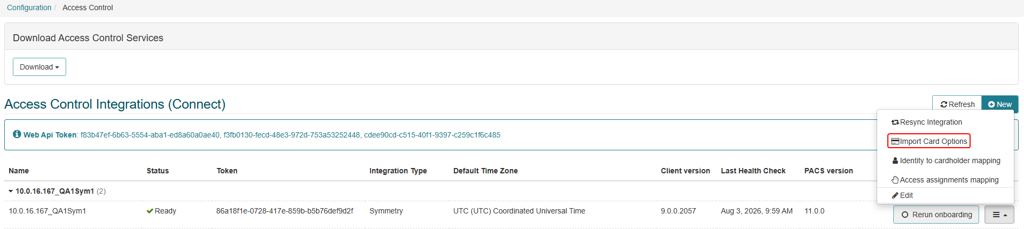
The Resync button on the identity details page will now also compare and sync Card Options, Deactivation Level and Visitor Escort options down to symmetry. Fields that are not owned by IDM (manually updated in IDM) will be ignored. There is also a new Import Card Options option available per-integration that will import all card options from Symmetry into IDM and set them as owned by IDM. This can be found in Configuration > IDM settings > Access Control, in the sub-menu for each integration with card options to import.
New Public API support for Card Options
The public API now exposes Card Options, Deactivation Level, and Card Usage on identity records, with new endpoints to retrieve and independently update each of the three panels for integrators building on top of IDM:
GET /internal/identities/{IdentityId}/symmetrycardoptions to get an identity’s existing card options
Put /identities/{EmployeeNumber}/symmetrycardoptions/{cardoptions|deactivationlevel|cardusage} to make changes to an identity’s Card Option, Deactivation Level or Card Usage fields.
Field-level audit logging for sync changes
The Identity Audit Report now captures field-level audit logging for all sync operations, giving administrators visibility into exactly which fields changed on an identity during a sync, and when.
Configurable visibility for Deactivation Level and Patrol
Administrators can now show or hide the Deactivation Level and Patrol fields via a new toggle in Configuration > IDM Settings > Screen Configuration > Employee and Non-Employee. This lets organizations that don't use these particular card options simplify the identity screen for their operators.